Position Sizing and Risk Management: A Guard for Every Trade
Most accounts blow up on bad sizing, not bad entries. How to size each trade to a fixed risk, and the on-chart robot coming soon to guard it on your platform.
sk an experienced trader what really kills accounts and few will say “bad entries.” The account-killer is size. One position that is three times too big turns a normal losing trade into a disaster, and a run of oversized trades can end a funded account in an afternoon. Position sizing and risk management — not a magic indicator — are the parts of trading you can actually control. This is a plain-English guide to sizing every trade to a fixed risk, and to the robot coming soon to do it for you.
What position sizing actually means
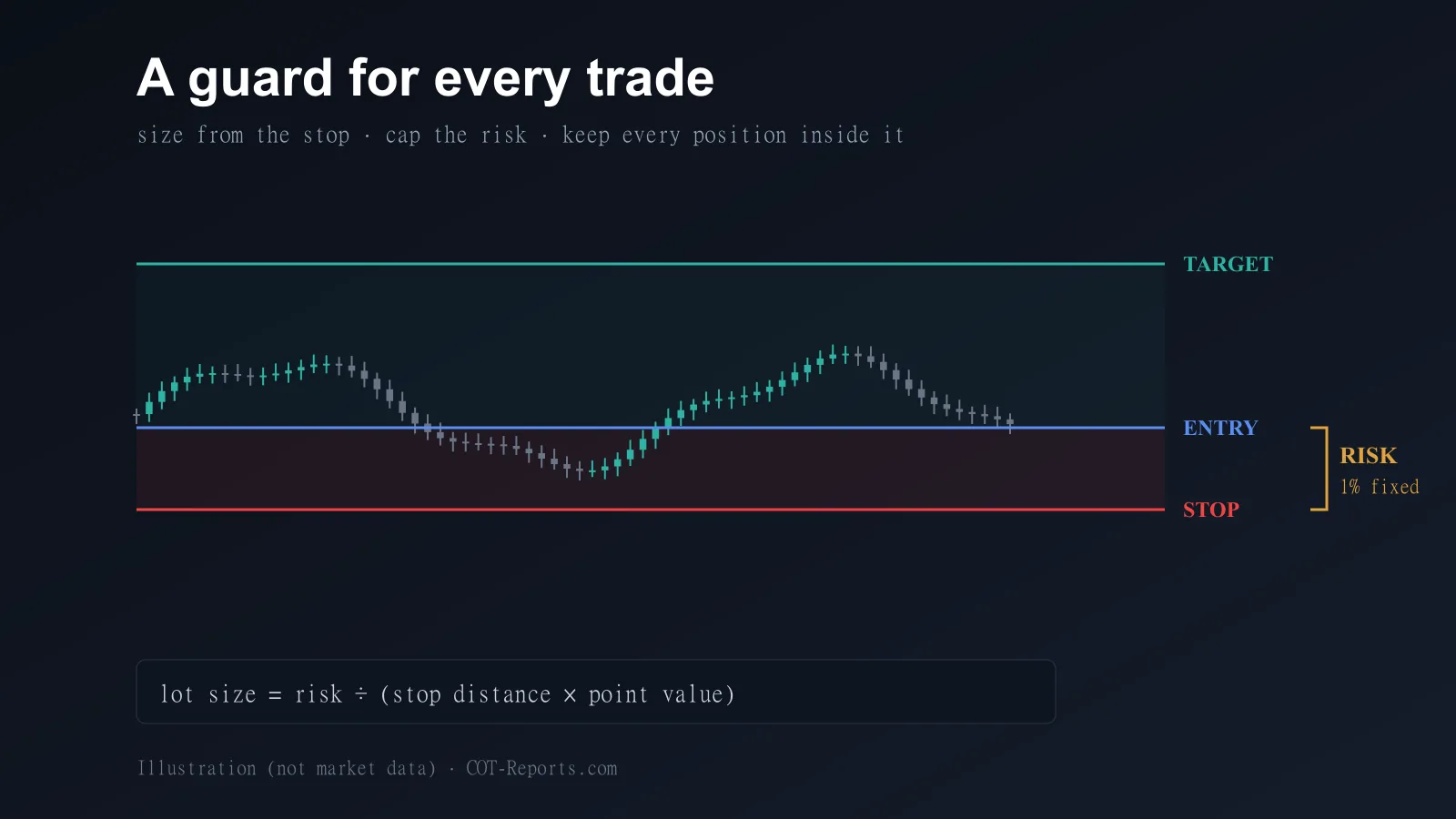
Position sizing answers one question: how many lots should I trade so that, if my stop is hit, I lose exactly the amount I decided to risk? The math is simple — lot size = (money you are risking) ÷ (stop-loss distance × the value of one point). Risk 1% of a 10,000-unit account with a 50-point stop and you get a precise lot size that caps the loss at 100 units — no more, no less.
Do this on every trade and no single loss can hurt you much. Skip it, and one trade can undo weeks of gains. Everything else in risk management is built on top of this one calculation.
Why doing it by hand fails
In theory you can calculate this yourself. In practice, few traders do it consistently. Manual sizing means a spreadsheet or a separate calculator window: retype the balance, the stop distance and the point value, then copy the answer back into the order ticket. It is slow, it breaks your focus, and it invites mistakes — a mistyped zero, a wrong point value, a step skipped when the market is moving fast.
And the moment you are rushed or emotional is exactly when you are most tempted to skip the math and “eyeball” the size. That single skipped calculation is how disciplined traders still blow up.
Risk management for funded and prop-firm accounts
For funded and prop-firm traders, sizing is not optional — it is the rulebook. These accounts come with hard limits: a maximum daily loss and a maximum overall drawdown that, once breached, end the account instantly. A single oversized trade can break a daily-loss limit on its own.
Proper risk management turns that threat into a system: cap the risk on every trade to a small, fixed percentage, and never let a position carry more risk than your plan allows. Do that, and the hard limits stop being a trap — they become a floor you rarely get near.
An on-chart guard: TradeLog Guardian
This is exactly what TradeLog Guardian is built to do. It is a standalone robot — an Expert Advisor for MetaTrader 4 and MetaTrader 5, and a cBot for cTrader — that lives on your chart. Drag your entry, stop-loss and take-profit lines, set your risk as a percentage of the balance or a fixed cash amount, and it computes the exact lot size. Its Risk Guard keeps watching every open position and automatically trims anything that risks more than your plan.
There is nothing to calculate and nothing to retype. Every Guardian version is coming soon while its final version is finished; each will be a one-time purchase with a lifetime license, for the platform you trade. It is the two-second version of the discipline every risk guide tells you to have.
Also coming: TradeLog Guardian for NinjaTrader 8
A NinjaTrader 8 version of TradeLog Guardian is on its way too. You set your risk as a cash amount or a percentage of the account and it sizes each order from the distance to your stop; Project Long and Project Short draw the entry, stop and target on the chart before you commit.
Its Guardian watches every open position and trims anything that risks more than your setting back to your risk, without moving your stop, and it shows a visible alarm when a position has no stop-loss. It is coming soon, with no price or date announced yet; its marketplace page lists every feature.
From sizing to review: close the loop with TradeLog
Sizing a trade correctly is only half of risk management; the other half is knowing what your trades actually do over time. That is where the TradeLog journal comes in. A TradeLog Basic or Premium subscription includes its own free syncing robot, so every trade is logged automatically — no CSV imports, no manual entry — and turned into the numbers that matter: win rate, average R-multiple, drawdown, and which setups actually make money.
Sizing protects the account; the journal measures the outcome and shows you where your edge really is.
Where to start
If position sizing is the part of your trading you keep meaning to fix, start there: size every trade to a fixed risk before you place it — our free Position Size Calculator does the math in seconds. TradeLog Guardian is coming soon to do it on the chart for you, on MT4, MT5, cTrader and NinjaTrader, and TradeLog turns your trades into a clear picture of what is working. Protecting the account you already have is the highest-return trade you will make all year.