
 COT-Reports
 One-page reference
COT
Cheat Sheet
Free
More COT tools
PDFFree
Free COT Cheat Sheet
A one-page reference guide explaining all COT trader categories, report types, and key terms. Perfect for beginners.
PRICE
FREE
Instant download
A pre-configured Microsoft Excel template that pulls live CFTC data on open: the latest week of every market plus ~10 years of the market you pick.
The COT Data Spreadsheet is a Microsoft Excel workbook that pulls CFTC Commitments of Traders data when you open it: the latest week of every market and about 10 years of history for the market you pick, from a list of 48. Pivots, charts and formulas are yours to build. It runs in Excel 2016 or newer on Windows.
COT-Reports CFTC data refreshed on open
A Microsoft Excel workbook (.xlsm with Power Query) wired to auto-refresh against the CFTC public archive. Two data tabs pull weekly Commitments of Traders data on open — the latest week of every market in the report and about 10 years of history for the market you pick (from a list of 48); everything else is yours to build — pivots, charts, custom formulas, sorting, conditional formatting. Optional API mode: paste your COT Data API key into a config cell and the history tab loads from our API, in its normalized column names (the same history length; the latest-week tab stays on the CFTC archive).
Windows blocks the macros in files downloaded from the internet. Unblock the file once, before you open it:
Right-click the downloaded file and choose Properties.
At the bottom, next to Security, tick Unblock, then click OK.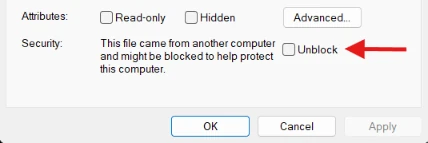
Open the file in Excel. If a yellow bar says the macros have been disabled, click Enable Content.
The first data refresh in the COT Data Spreadsheet asks how to connect to the CFTC’s site (publicreporting.cftc.gov): keep Anonymous selected and click Connect. Once per computer.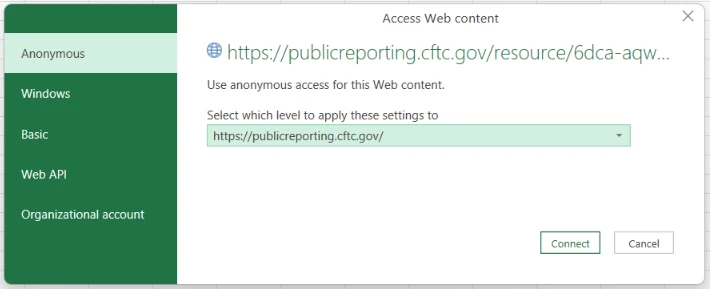
Trading involves substantial risk of loss. The tools, robots and data sold here support your own decisions — they are not investment advice and do not guarantee results. Any performance figures shown are hypothetical unless stated otherwise (CFTC Rule 4.41). Risk disclosure
Tools that work alongside this one — COT data, spreadsheets, guides, the TradeLog journal and Guardian risk robots (coming soon). COT-Reports builds its own products; a third-party product is listed only after we approve it.
COT-ReportsOne-page referenceA one-page reference guide explaining all COT trader categories, report types, and key terms. Perfect for beginners.
COT-ReportsA step-by-step guide to reading and interpreting the CFTC Commitments of Traders (COT) reports, right here on the site with live examples. Beginners welcome.
COT-Reports JSON · Bearer auth
REST API for the entire CFTC Commitments of Traders dataset. Bearer auth, JSON responses, a monthly subscription.
COT-Reports CSV + NDJSON
All four CFTC Commitments of Traders report families, every market, every week (Legacy back to 1986) — in two archives, one per CFTC variant, each in CSV and NDJSON.
COT-Reports2 PDF guides includedA complete Microsoft Excel trading journal with statistics, equity curve and drawdown analysis. Includes 2 PDF guides.
The sibling app to COT-Reports: auto-syncs trades from MT4/MT5, cTrader, NinjaTrader, Tradovate and Rithmic. Analytics, prop-firm tracking, multi-account.
 cBot
cBotAn on-chart position-size calculator and automatic risk guard for cTrader. Size every trade from your stop-loss and cap your risk automatically.
 Expert Advisor
An on-chart position-size calculator and automatic risk guard for MetaTrader 4. Size every trade from your stop-loss and cap your risk automatically.
Expert AdvisorAn on-chart position-size calculator and automatic risk guard for MetaTrader 5. Size every trade from your stop-loss and cap your risk automatically.
 Add-on
An on-chart position-size calculator and automatic risk guard for NinjaTrader 8. Size every trade from your stop and keep every open position inside your risk.